
How to Remove Duplicate Bookmarks in Chrome (And Keep the Right Copy)
Every duplicate-bookmark tool deletes the extras. Almost none will tell you which copy it keeps. Here's how to find duplicates in Chrome — including the http/https and www pairs most scans miss — and the rule that decides which one survives.
Chrome has no built-in way to find duplicate bookmarks. It will happily let you save the same page fifty times, and after a few years and a couple of sync mishaps, plenty of libraries have exactly that. So people install a cleaner, press the big button, and watch a few hundred bookmarks disappear.
Here is the question almost nobody asks first: of the two copies, which one did it just delete?
That question sounds pedantic until you realise the two copies usually aren't identical. This guide covers both halves — finding the duplicates Chrome hides from you, and deciding which copy deserves to survive.
Why do I have duplicate bookmarks?
Four causes, in rough order of how many bookmarks they account for:
- Sync hiccups. Signing into Chrome on a new device, or a sync that half-failed and retried, can merge the same tree into itself. This is the one that produces hundreds at a time, and it is why "duplicate bookmarks after sync" is such a common complaint.
- Re-saving. You bookmark an article, forget, and bookmark it again eighteen months later from a different folder. Chrome's star button doesn't warn you.
- Imports. Importing an HTML backup into a profile that already has those bookmarks doubles everything it touches.
- The same page under a different address. You saved
http://example.com/postin 2019 andhttps://www.example.com/post/last month. Same article, same server, two bookmarks — and this is the category most tools quietly ignore.
The duplicates most scans miss
If a tool compares URLs as plain text, these are all "different" bookmarks:
http://example.com/post
https://example.com/post
https://www.example.com/post
https://example.com/post/
https://example.com/post?utm_source=newsletter
Every one of those loads the same article. A duplicate scan that reports "no duplicates found" here is giving you the one answer you can disprove at a glance.
So a useful scan compares a normalised form of the URL — the protocol dropped, the host lowercased and www. removed, a trailing slash trimmed, tracking parameters like utm_source and fbclid stripped, and #intro-style scroll anchors ignored.
What must never be collapsed is anything that can change which page you land on. Query parameters that select content — ?id=, ?q=, ?page=, ?v= on YouTube — have to survive, or you'd be told two different articles are duplicates of each other. Same for hash routes: example.com/#/dashboard and example.com/#/settings are two pages in a single-page app that share every byte before the #. Collapsing them is the failure that actually costs you a bookmark, and nothing on screen would contradict it.
The rule of thumb: missing a duplicate leaves you where you already were; merging two different pages loses someone's bookmark. Only cosmetic differences get collapsed.
The part nobody talks about: which copy gets deleted?
Once the scan groups those five URLs together, "delete the extras" stops being an obvious instruction. The copies differ in address, in title, in which folder you filed them in, and in how long you've had them. Deleting the wrong one is a small, silent loss — and it's silent precisely because the survivor looks fine.
Most tools resolve this by keeping whichever copy their scan happened to reach first. That's not a choice; it's a side effect of the order the tool walked your bookmark tree. Bookmark Maestro used to do exactly this, and fixing it meant writing the rule down.
The rule is a ladder. The copies in a group are compared rung by rung, and the first rung that separates the top two decides the winner — and becomes the reason printed on the row.
| Rung | Why it sits there | |
|---|---|---|
| 1 | It still answers | The only rung whose misfire costs you the page itself, rather than a preference. If you've run a link check and one copy is a 404, that copy loses. |
| 2 | It has a real title | The URL survives on whichever copy is kept. The title only survives on the copy that has one, so a copy titled example.com loses to one titled "Rust async book". |
| 3 | It's in your Google Account | Signed in to Chrome without sync, you have two bookmark trees, and a page saved on both is a duplicate whose copies differ in exactly one thing that matters: the account's copy follows you to your next computer and the device's copy doesn't. It sits above the two placement rungs knowingly — deleting the on-this-device copy costs one visible row on the merged bookmarks bar, and keeping it instead costs you the bookmark on every other machine you own. On a single-tree profile it abstains. |
| 4 | It's on the bookmarks bar | The one placement whose deletion you'd notice without opening any extension. Deleting the copy sitting on your toolbar and keeping a buried one is the most jarring thing a cleanup can do. |
| 5 | It's filed in a folder | The loose copy at the top of Other Bookmarks is almost always the accidental re-save. The filed one carries work you did by hand. |
| 6 | https over http | Below placement on purpose — http→https redirects are near-universal, so keeping the http copy rarely costs you access, while re-filing a bookmark is manual work no redirect can do for you. |
| 7 | No tracking parameters | Keeping the ?utm_source= copy just hands work to the next cleanup. |
| 8 | A shorter URL | Settles whatever cosmetic difference is left: a www., a trailing slash. |
| 9 | Opened more recently | The copy you actually click is the live one. Chrome only records this since version 114, so on most libraries this rung abstains. |
| 10 | Added first | By here the copies differ in nothing else you'd notice — and only the earlier date is true. It's also the date your library's age and growth statistics are drawn from, so keeping the newer copy quietly walks your whole history forward every time you clean up. |
| 11 | Bookmark ID | The floor. Boring on purpose: it guarantees the same library cleaned twice gives the same answer, rather than something that shifts between runs. |
Two properties of that ladder are worth stating outright, because they're the ones that make it trustworthy rather than merely clever.
Missing data is never a verdict. A library where you've never run a link check has no opinion about rung 1 — not a negative one. A bookmark with no saved date loses rung 10 rather than winning it with a zero. This matters more than it sounds: link checks follow redirects, and nearly every live http:// URL redirects to its https twin. If "untested" ranked below "redirects", then in a half-checked library rung 1 would fire, keep the http copy, and rung 6 — the rung that exists for precisely that pair — would never run at all.
One survivor per group, unchanged. The cleanup only ever deletes. It never rewrites the survivor's title or moves it to a different folder to make it "better". That's also why "has a real title" sits above https and the folder rungs: it's the only place in the ladder that can spare the copy carrying the only name the page has.
How to remove duplicate bookmarks in Chrome
With the Bookmark Maestro extension:
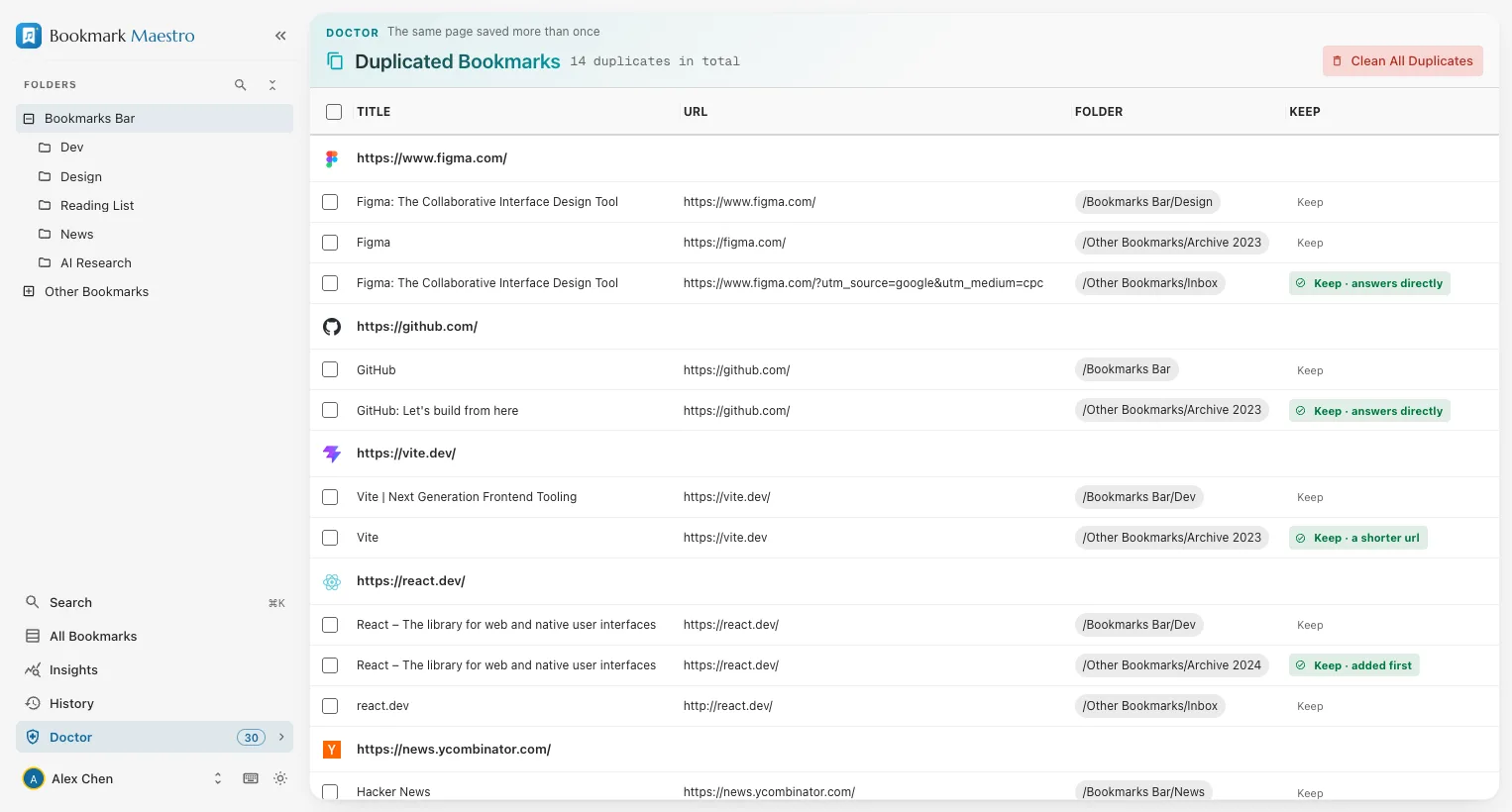
- Open the manager → Bookmark Doctor → Duplicated Bookmarks. The scan runs entirely on your device — your bookmarks are never uploaded — and groups the cosmetic variants above into one row each.
- Read the marks before you press anything. Every group shows its copies side by side with their own URLs and folders, and the survivor is marked with the reason it won: Keep · on the bookmarks bar, Keep · https, Keep · the other copy is dead.
- Disagree where you want to. Press Keep on any other copy in a group and the mark moves to it. Your choice outranks the whole ladder.
- Clean All Duplicates. The confirmation tells you how many are kept and on whose authority — "12 · https, 8 · the other copy is dead, 6 · filed in a folder" — so you're approving a rule, not a number. On a profile with two bookmark trees it also says which side the deletions come off: Deleting 14 on this device · 3 in your Google Account.
Run a link check first if you can. It's the one thing that unlocks rung 1, and it turns the cleanup from "which of these looks better" into "which of these still works". Bookmark Doctor's dead-link scan runs in the background, so you can start it and carry on.
Doing it by hand
If you'd rather not install anything, there is a manual route, and it's honest about being tedious: export your bookmarks to HTML (Bookmark manager → ⋮ → Export bookmarks), open the file in a spreadsheet or text editor, sort by URL, and eyeball the neighbours. This finds byte-identical duplicates only — the http/https and www. pairs will sit far apart and stay invisible — and re-importing a deduplicated file leaves you with a second copy of your whole tree unless you delete the original first. For a library of a few hundred it's viable. Past that, it isn't.
Do it in this order
Tracking parameters are the single biggest reason duplicate scans under-report. If your scan doesn't strip them for you, clean tracking parameters out first, then run the duplicate check — pairs that only ever differed by a ?utm_source= suddenly become visible. And before either, if you're nervous, take a backup. Chrome itself has no undo for a bulk delete, and it never grows one: its API can create a bookmark but cannot revive one with its original ID and creation date. What Bookmark Maestro adds is a way back rather than a way around that — every deletion made in this browser is kept for 30 days and can go back where it was, as a new bookmark dated today. A file you exported is still the copy you own.
FAQs
Q: Why do I have duplicate bookmarks?
A: Most commonly a Chrome sync that merged the same tree into itself, which produces them by the hundred. The rest come from re-saving a page you'd already bookmarked, importing an HTML backup into a profile that already had those bookmarks, or saving the same page under two addresses — http and https, with and without www., or with a ?utm_source= tag picked up from a newsletter.
Q: How do I get rid of multiple bookmarks at once?
A: Chrome's own bookmark manager supports multi-select — Ctrl/Cmd-click or Shift-click a range, then Delete — but it can't find the duplicates for you, so you're picking them out by eye. A duplicate scan does the finding, then removes every extra in one action.
Q: Which copy does a duplicate cleaner keep?
A: Most keep whichever copy their scan reached first, which is an accident of tree order rather than a decision. Bookmark Maestro compares the copies down a stated ladder — still answers, has a real title, in your Google Account, on the bookmarks bar, filed in a folder, https, no tracking parameters, shorter URL, opened more recently, added first — and prints the rung that decided it next to the copy it kept, so you can disagree before anything is deleted.
Q: Can I undo deleting duplicate bookmarks?
A: In Bookmark Maestro, yes — for 30 days. Every deletion made in this browser goes to History and can be sent back to the folder and position it came from, whole folders included. Be clear about what returns, though: Chrome's bookmarks API can create a bookmark but cannot revive one with its original ID and creation date, so what comes back is a new bookmark dated today. That premise hasn't changed; only the conclusion has. It's still why the choice is shown before the deletion rather than apologised for after it, and why an exported file — which does carry the original dates — is worth having before a big cleanup.
Q: Are http and https versions of a page really duplicates?
A: For practically every site on the public web, yes — the http address redirects to the https one and serves the same document. Treating them as separate bookmarks is what leaves people with two copies of the same article and a duplicate scan that insists everything is fine.
Q: How do I clean up my bookmarks in Chrome more generally?
A: Duplicates are one of five kinds of bookmark debt. The others are near-duplicates (same page, different query string), dead links, empty folders, and URLs carrying tracking parameters. Bookmark Maestro covers all five — four of them as Bookmark Doctor tabs, dead links as a status column you can sweep the whole library with — and scores the result out of 100, so you can see which one is actually worth your afternoon.