
How to Remove Tracking Parameters From Your Chrome Bookmarks (in Bulk)
Years of saved links means years of saved utm_source, fbclid and mc_eid. Here's how to clean tracking parameters out of your Chrome bookmarks — safely, with a preview and an undo.
Open your oldest bookmark folder and look at the URLs. If you've been saving links from newsletters, social feeds and search ads for a few years, half of them drag a tail: ?utm_source=newsletter&utm_medium=email&fbclid=IwAR2…. Browsers now strip some of this when you click or share — Firefox, Brave and Safari all do it in places — but nothing, in any browser, cleans the links you already saved. That backlog is yours to fix, and this guide shows the safe way to do it.
Why bother cleaning bookmark URLs
Privacy: click IDs (fbclid, gclid) uniquely identify the click that brought you to a page, and email IDs (mc_eid, _hsenc) identify you as a subscriber. Every time you reopen or share that bookmark, the identifier rides along.
Duplicates: the same article saved once clean and once with ?utm_source= is two bookmarks to Chrome. Tracking parameters are the single biggest reason duplicate-bookmark tools miss real duplicates.
Clutter: a 40-character URL is readable and searchable; a 300-character one is neither.
The catch: bulk-rewriting bookmarks is riskier than it looks
Live URL-cleaner extensions (the ClearURLs family) operate on navigation — if a cleaned URL breaks, the page fails right now and you reload. Rewriting a saved bookmark has no such feedback: a bad rewrite surfaces weeks later, when the original is long gone. Two kinds of URL make careless cleaning genuinely destructive:
- Signed links — S3 downloads, SharePoint shares, magic logins, unsubscribe links. The signature covers the whole query string; removing any parameter breaks them.
- Tracking lookalikes —
?ref=routes content on some sites,?tag=filters posts on most blogs,?t=120is a YouTube timestamp.
So whatever you use must: work from a closed list of known-safe parameters (no pattern-guessing), skip signed links entirely, show you a preview before writing anything, and keep an undo.
One link at a time: the free web tool
For a handful of URLs, paste them into our free URL cleaner — one per line, cleaned instantly in your browser (nothing is uploaded). It strips the consensus list of tracking parameters and refuses to touch signed links.
Your whole library at once: the Tracking Parameters doctor
The Bookmark Maestro extension does the same clean across every saved bookmark:
- Open the manager → Bookmark Doctor → Tracking Parameters. The scan runs locally (your bookmarks never leave the device) and lists every bookmark whose URL would change.
- Read the preview. Each row shows the URL with the removable parameters struck through — what's not struck through is exactly the URL you'll keep. Untick anything you'd rather leave.
- Optionally enable the two deeper tiers. Site-specific deep clean applies Brave's per-site rules (
?si=on Spotify/YouTube,?ref=on Reddit, Amazon's tracking set). Affiliate tags stays off by default — those credit the creator whose link you clicked, so removing them is your call. - Clean, with a net. One click rewrites the selected bookmarks in place. The originals go into an undo ledger first — Undo last clean restores them byte-for-byte.
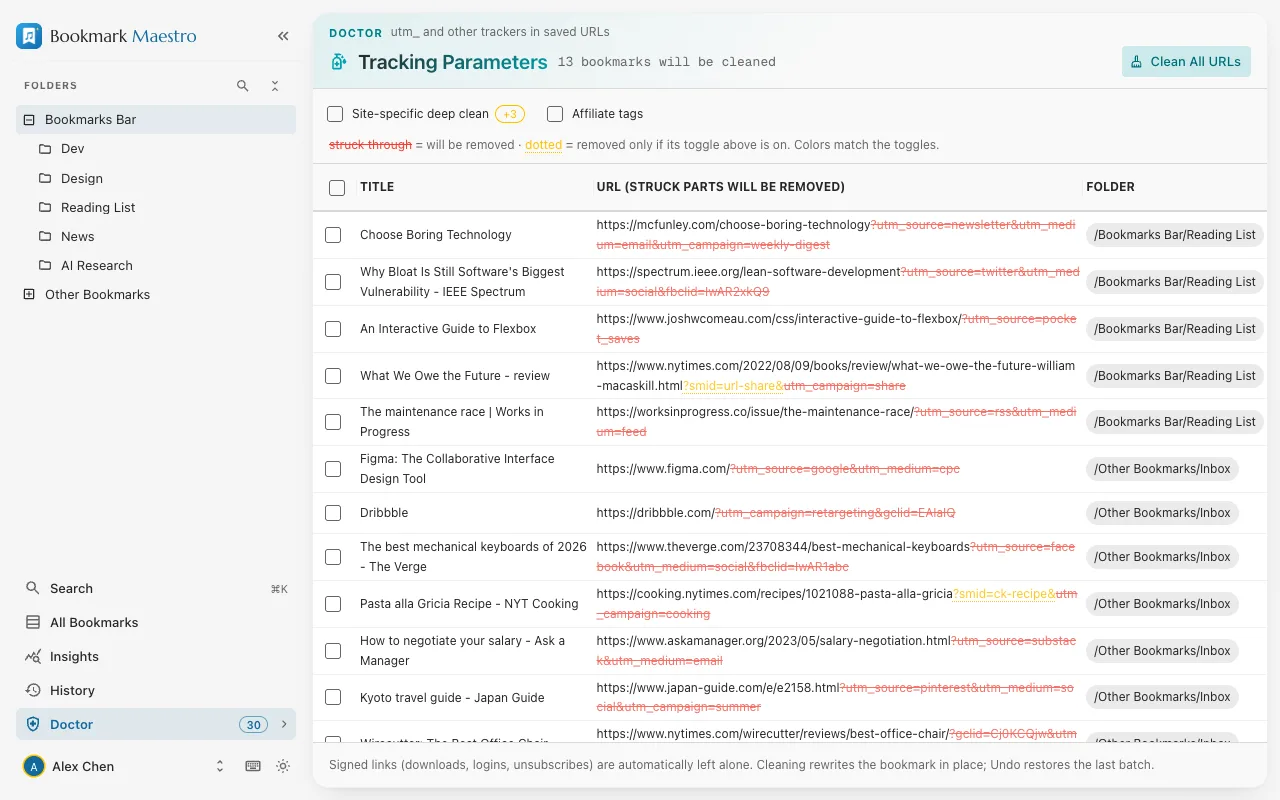
Signed and login-ish links never even appear in the list — the skip rules run before anything is offered for cleaning.
Do it in this order: clean first, then dedupe
Tracking parameters are why duplicate scans miss things. Clean them out first and your duplicate check (Bookmark Doctor → Duplicated Bookmarks) suddenly finds every pair that only differed by a ?utm_source=. Two passes, permanently tidier library.
FAQs
Q: Will cleaning change which page a bookmark opens?
A: No — that's the design constraint. Only parameters that identify a campaign or a click are removed; everything that selects content stays, and URLs carrying signatures or tokens are skipped entirely.
Q: Can I undo a bulk clean?
A: Yes. The originals are stored before anything is rewritten, and Undo last clean restores the most recent batch byte-for-byte. Bookmarks you've edited since are left alone.
Q: Does my bookmark data get uploaded during cleaning?
A: No. The scan and the rewrite both run locally in the extension, through Chrome's own bookmarks API. Nothing about your bookmarks touches a server.
Q: Why didn't the scan flag a URL that clearly has ?ref= in it?
A: ref is only tracking on some sites — on others it's functional. The default scan sticks to universally safe parameters; enable site-specific deep clean to remove ref and friends on the sites where they're known to be pure tracking.